Turing.jl
This page provides a fairly high-level overview of how to use FlexiChains with Turing.jl.
If you have a previous workflow that uses MCMCChains.jl and want to find out how to update it, you might also be interested in the MCMCChains migration guide.
Sampling
Since Turing.jl v0.45, FlexiChains is the default chain type returned by MCMC sampling.
Not on Turing v0.45 yet?
To obtain a FlexiChain with older versions of Turing.jl, you can specify the chain_type keyword argument when calling sample:
using FlexiChains
sample(model, sampler, N; chain_type=VNChain)
Let's use a non-trivial model so that we can illustrate some features of FlexiChains.
using Turing, FlexiChains

y = [28, 8, -3, 7, -1, 1, 18, 12]
sigma = [15, 10, 16, 11, 9, 11, 10, 18]
@model function eight_schools(y, sigma)
    mu ~ Normal(0, 5)
    tau ~ truncated(Cauchy(0, 5); lower=0)
    theta ~ MvNormal(fill(mu, length(y)), tau^2 * I)
    for i in eachindex(y)
        y[i] ~ Normal(theta[i], sigma[i])
    end
    return (mu=mu, tau=tau)
end
model = eight_schools(y, sigma)
chain = sample(model, NUTS(), 5)╭─FlexiChain (5 iterations, 1 chain) ──────────────────────────────────────────╮
│ ↓ iter = 3:7 │
│ → chain = 1:1 │
│ │
│ Parameters (3) ── VarName │
│ Float64 mu, tau │
│ Vector{Float64} theta (8,) │
│ │
│ Extras (14) │
│ Int64 n_steps, tree_depth │
│ Bool is_accept, numerical_error │
│ Float64 acceptance_rate, log_density, hamiltonian_energy │
│ hamiltonian_energy_error, max_hamiltonian_energy_error, step_size │
│ nom_step_size, logprior, loglikelihood, logjoint │
╰──────────────────────────────────────────────────────────────────────────────╯Note
We only run 5 MCMC iterations here to keep the output in the following sections small.
Key types
First, notice in the printout above that a FlexiChain stores 'parameters' and 'extra keys' separately. Parameters correspond to random variables of the model you sampled from, whereas other keys are extra data associated with the samples drawn (for example, the log-joint probability of each sample).
In FlexiChains, these are wrapped in the FlexiChains.Parameter and FlexiChains.Extra types respectively. Thus, the parameter mu is really stored as Parameter(@varname(mu)), and the log-joint probability is Extra(:logjoint).
For a FlexiChain{T}, all Parameter keys must wrap objects that subtype T. Extras on the other hand can wrap anything.
VNChain is an alias for FlexiChain{VarName}, i.e., the parameters are stored as VarNames, which is the natural output for Turing.jl.
SymChain
For other modelling packages it may sometimes be more natural to store parameters as Symbols instead of VarNames. In that case, you can use SymChain (an alias for FlexiChain{Symbol}) instead of VNChain.
Accessing data
FlexiChains provides multiple different ways to access the data for a given key.
Parameters
To access parameters, the recommended way is to use VarNames to index into the chain. VarName is a data structure defined in AbstractPPL.jl, and is what Turing.jl uses to represent the name of a random variable (appearing on the left-hand side of a tilde-statement).
VarNames are most easily constructed by applying the @varname macro to the name of the variable that you want to access. For example, this directly gives us the value of mu in each iteration as a plain old vector of floats.
chain[@varname(mu)]┌ 5×1 DimArray{Float64, 2} Parameter(mu) ┐
├────────────────────────────────────────┴──────────── dims ┐
↓ iter Sampled{Int64} 3:7 ForwardOrdered Regular Points,
→ chain Sampled{Int64} 1:1 ForwardOrdered Regular Points
└───────────────────────────────────────────────────────────┘
↓ → 1
3 -1.33112
4 -1.33112
5 -1.33112
6 -1.33112
7 -1.33112Wrapping in Parameter and Extra
When looking up a parameter, you do not need to wrap the VarName in FlexiChains.Parameter(...): this will be automatically done for you. Extra keys always need to be wrapped (but see also the shortcut for Symbol-based indexing below).
DimMatrix
Indexing into a FlexiChain returns a DimensionalData.DimMatrix. This behaves exactly like a regular Matrix, but additionally carries extra information about its dimensions.
This allows you to keep track of what each dimension means, and also allows for more advanced indexing operations, which are described in the 'indexing' page.
For vector-valued parameters like theta, this works in exactly the same way, except that you get a DimMatrix of vectors.
chain[@varname(theta)]┌ 5×1 DimArray{Vector{Float64}, 2} Parameter(theta) ┐
├───────────────────────────────────────────────────┴─ dims ┐
↓ iter Sampled{Int64} 3:7 ForwardOrdered Regular Points,
→ chain Sampled{Int64} 1:1 ForwardOrdered Regular Points
└───────────────────────────────────────────────────────────┘
↓ → … 1
3 [0.857227, -1.07803, 0.219094, 1.4346, 1.2374, -1.68944, 0.849867, -1.03385]
4 [0.857227, -1.07803, 0.219094, 1.4346, 1.2374, -1.68944, 0.849867, -1.03385]
5 [0.857227, -1.07803, 0.219094, 1.4346, 1.2374, -1.68944, 0.849867, -1.03385]
6 [0.857227, -1.07803, 0.219094, 1.4346, 1.2374, -1.68944, 0.849867, -1.03385]
7 … [0.857227, -1.07803, 0.219094, 1.4346, 1.2374, -1.68944, 0.849867, -1.03385]This is probably the biggest difference between FlexiChains and MCMCChains. MCMCChains by default will break vector-valued parameters into multiple scalar-valued parameters called theta[1], theta[2], etc., whereas FlexiChains keeps them together as they were defined in the model.
If you want a 3D array...
If you want to access theta as a 3D array of shape (num_iterations, num_chains, length(theta)), you can also pass the keyword argument stack=true to getindex:
chain[@varname(theta), stack=true]┌ 5×1×8 DimArray{Float64, 3} Parameter(theta) ┐
├─────────────────────────────────────────────┴───────── dims ┐
↓ iter Sampled{Int64} 3:7 ForwardOrdered Regular Points,
→ chain Sampled{Int64} 1:1 ForwardOrdered Regular Points,
↗ AnonDim Sampled{Int64} 1:8 ForwardOrdered Regular Points
└─────────────────────────────────────────────────────────────┘
[:, :, 1]
↓ → 1
3 0.857227
4 0.857227
5 0.857227
6 0.857227
7 0.857227If you want to obtain only the first element of theta, you don't need to manipulate the DimMatrix. You can just index into the chain with the corresponding VarName:
chain[@varname(theta[1])]┌ 5×1 DimArray{Float64, 2} Parameter(theta[1]) ┐
├──────────────────────────────────────────────┴────── dims ┐
↓ iter Sampled{Int64} 3:7 ForwardOrdered Regular Points,
→ chain Sampled{Int64} 1:1 ForwardOrdered Regular Points
└───────────────────────────────────────────────────────────┘
↓ → 1
3 0.857227
4 0.857227
5 0.857227
6 0.857227
7 0.857227In this way, you can 'break down', or access nested fields of, larger parameters. That is, if your model has x ~ dist, FlexiChains will let you access some field or index of x.
Heterogeneous data
If some samples of x have one element and others have two elements, attempting to access x[2] will return an array with missing values for the samples where x only has one element.
You can also use keyword arguments when indexing to specify which chains or iterations you are interested in. Note that when using square brackets to index, keyword arguments must be separated from positional arguments by a comma, not a semicolon!
chain[@varname(mu), iter=2:4, chain=1]┌ 3-element DimArray{Float64, 1} Parameter(mu) ┐
├──────────────────────────────────────────────┴────── dims ┐
↓ iter Sampled{Int64} 4:6 ForwardOrdered Regular Points
└───────────────────────────────────────────────────────────┘
4 -1.33112
5 -1.33112
6 -1.33112You can also use selectors from DimensionalData.jl to specify which iterations or chains you want.
chain[@varname(mu), iter=Not(At(7)), chain=At(1)]┌ 4-element DimArray{Float64, 1} Parameter(mu) ┐
├──────────────────────────────────────────────┴────────────── dims ┐
↓ iter Sampled{Int64} [3, …, 6] ForwardOrdered Irregular Points
└───────────────────────────────────────────────────────────────────┘
3 -1.33112
4 -1.33112
5 -1.33112
6 -1.33112The indexing behaviour of FlexiChains is described fully on the Indexing page.
Other keys
In general Turing.jl tries to package up some extra metadata into the chain that may be helpful. For example, the log-joint probability of each sample is stored with the key :logjoint. To access non-parameter information like this in an unambiguous fashion, you should use the Extra wrapper.
using FlexiChains: Extra

chain[Extra(:logjoint)]
┌ 5×1 DimArray{Float64, 2} Extra(:logjoint) ┐
├───────────────────────────────────────────┴───────── dims ┐
↓ iter Sampled{Int64} 3:7 ForwardOrdered Regular Points,
→ chain Sampled{Int64} 1:1 ForwardOrdered Regular Points
└───────────────────────────────────────────────────────────┘
↓ → 1
3 -152.963
4 -152.963
5 -152.963
6 -152.963
7 -152.963Warning
In older versions of Turing.jl, MCMCChains would store the log-joint probability as :lp. FlexiChains uses :logjoint instead, which is clearer. Since Turing v0.42, both MCMCChains and FlexiChains use :logjoint.
If there is no ambiguity in the symbol :logjoint, then you can use a shortcut which is described in the next section.
Indexing by Symbol: a shortcut
If you are used to MCMCChains.jl, you may find this more cumbersome than before. So, FlexiChains provides some shortcuts for accessing data. You can index into a FlexiChain with a single Symbol, and as long as it is unambiguous, it will return the corresponding data.
chain[:mu] # parameter┌ 5×1 DimArray{Float64, 2} Parameter(mu) ┐
├────────────────────────────────────────┴──────────── dims ┐
↓ iter Sampled{Int64} 3:7 ForwardOrdered Regular Points,
→ chain Sampled{Int64} 1:1 ForwardOrdered Regular Points
└───────────────────────────────────────────────────────────┘
↓ → 1
3 -1.33112
4 -1.33112
5 -1.33112
6 -1.33112
7 -1.33112What does unambiguous mean?
In this case, because the only key k for which Symbol(k.name) == :mu is Parameter(@varname(mu)), we can safely identify Parameter(@varname(mu)) as the key that we want. If this chain also had an extra key called Extra(:mu), then this would be ambiguous, and FlexiChains would throw an error.
No sub-varnames
You cannot use chain[Symbol("theta[1]")] as a replacement for chain[@varname(theta[1])].
Likewise, we can omit wrapping :logjoint in Extra(...):
chain[:logjoint] # other key┌ 5×1 DimArray{Float64, 2} Extra(:logjoint) ┐
├───────────────────────────────────────────┴───────── dims ┐
↓ iter Sampled{Int64} 3:7 ForwardOrdered Regular Points,
→ chain Sampled{Int64} 1:1 ForwardOrdered Regular Points
└───────────────────────────────────────────────────────────┘
↓ → 1
3 -152.963
4 -152.963
5 -152.963
6 -152.963
7 -152.963Prefix-agnostic indexing
If you want to access a variable that has been prefixed (e.g. because it is part of a submodel) but you don't want to specify the full prefix, you can use FlexiChains.Prefixed:
using Turing
using FlexiChains: Prefixed, VNChain

@model inner() = x ~ MvNormal(zeros(2), I)

@model function outer()
    a ~ to_submodel(inner())
    return nothing
end

pfx_chain = sample(outer(), MH(), 5)

# Inside the chain, the actual key is `@varname(a.x)`;
# this will pick out that key.
pfx_chain[Prefixed(@varname(x))]
┌ 5×1 DimArray{Vector{Float64}, 2} Parameter(a.x) ┐
├─────────────────────────────────────────────────┴─── dims ┐
↓ iter Sampled{Int64} 1:5 ForwardOrdered Regular Points,
→ chain Sampled{Int64} 1:1 ForwardOrdered Regular Points
└───────────────────────────────────────────────────────────┘
↓ → 1
1 [-0.984413, 0.209661]
2 [-0.363435, 0.202856]
3 [-0.874931, 1.14167]
4 [-1.89374, -0.576629]
5 [-0.880544, -0.13761]Sub-VarNames are also supported:
pfx_chain[Prefixed(@varname(x[1]))]┌ 5×1 DimArray{Float64, 2} Parameter(a.x[1]) ┐
├────────────────────────────────────────────┴──────── dims ┐
↓ iter Sampled{Int64} 1:5 ForwardOrdered Regular Points,
→ chain Sampled{Int64} 1:1 ForwardOrdered Regular Points
└───────────────────────────────────────────────────────────┘
↓ → 1
1 -0.984413
2 -0.363435
3 -0.874931
4 -1.89374
5 -0.880544Summary statistics
Overall summaries
For a very quick summary of the chain, you can use StatsBase.summarystats (which FlexiChains reexports):
using FlexiChains: summarystats

summarystats(chain)╭─FlexiSummary (9 statistics) ─────────────────────────────────────────────────╮
│ iter collapsed │
│ chain collapsed │
│ ↓ stat = [mean, std, mcse, ess_bulk, ess_tail, rhat, q5, q50, q95] │
│ │
│ Parameters (10) ── VarName │
│ Float64 mu, tau, theta[1], theta[2], theta[3], theta[4], theta[5] │
│ theta[6], theta[7], theta[8] │
│ │
│ Extras (14) │
│ Float64 n_steps, is_accept, acceptance_rate, log_density │
│ hamiltonian_energy, hamiltonian_energy_error │
│ max_hamiltonian_energy_error, tree_depth, numerical_error │
│ step_size, nom_step_size, logprior, loglikelihood, logjoint │
│ │
│ Summary │
│ param mean std mcse … rhat q5 q50 q95 │
│ mu -1.3311 0.0000 NaN NaN -1.3311 -1.3311 -1.3311 │
│ tau 0.3343 0.0000 NaN NaN 0.3343 0.3343 0.3343 │
│ theta[1] 0.8572 0.0000 NaN NaN 0.8572 0.8572 0.8572 │
│ theta[2] -1.0780 0.0000 NaN NaN -1.0780 -1.0780 -1.0780 │
│ theta[3] 0.2191 0.0000 NaN … NaN 0.2191 0.2191 0.2191 │
│ theta[4] 1.4346 0.0000 NaN NaN 1.4346 1.4346 1.4346 │
│ theta[5] 1.2374 0.0000 NaN NaN 1.2374 1.2374 1.2374 │
│ theta[6] -1.6894 0.0000 NaN NaN -1.6894 -1.6894 -1.6894 │
│ theta[7] 0.8499 0.0000 NaN NaN 0.8499 0.8499 0.8499 │
│ theta[8] -1.0339 0.0000 NaN … NaN -1.0339 -1.0339 -1.0339 │
╰──────────────────────────────────────────────────────────────────────────────╯Note
The large number of NaN's and Inf's here are just because of the very short chain length. On a real chain you would get proper statistics.
To index into this, you can use a similar syntax as for FlexiChains:
ss = summarystats(chain)
ss[@varname(mu)]
┌ 9-element DimArray{Float64, 1} Parameter(mu) ┐
├──────────────────────────────────────────────┴──── dims ┐
↓ stat Categorical{Symbol} [:mean, …, :q95] Unordered
└─────────────────────────────────────────────────────────┘
:mean -1.33112
:std 0.0
:mcse NaN
:ess_bulk NaN
:ess_tail NaN
:rhat NaN
:q5 -1.33112
:q50 -1.33112
:q95 -1.33112or to access an individual statistic
ss[@varname(mu), stat=:mean]-1.3311221631786458Alternatively, you can directly convert the FlexiSummary into an array and manipulate it as you would any other array. (Note that Array(ss) also works, but you lose the dimension information in that case.)
DimArray(ss)┌ 9×10 DimArray{Float64, 2} ┐
├───────────────────────────┴───────────────────────── dims ┐
↓ stat Categorical{Symbol} [:mean, …, :q95] Unordered,
→ param Categorical{VarName} [mu, …, theta[8]] Unordered
└───────────────────────────────────────────────────────────┘
↓ → mu tau … theta[7] theta[8]
:mean -1.33112 0.334326 0.849867 -1.03385
:std 0.0 0.0 0.0 0.0
:mcse NaN NaN NaN NaN
:ess_bulk NaN NaN NaN NaN
:ess_tail NaN NaN … NaN NaN
:rhat NaN NaN NaN NaN
:q5 -1.33112 0.334326 0.849867 -1.03385
:q50 -1.33112 0.334326 0.849867 -1.03385
:q95 -1.33112 0.334326 0.849867 -1.03385By default, summarystats will split VarNames up. This is done because summary statistics often only make sense for scalar-valued parameters. If you want to avoid this, you can set split_varnames=false:
summarystats(chain; split_varnames=false)╭─FlexiSummary (9 statistics) ─────────────────────────────────────────────────╮
│ iter collapsed │
│ chain collapsed │
│ ↓ stat = [mean, std, mcse, ess_bulk, ess_tail, rhat, q5, q50, q95] │
│ │
│ Parameters (3) ── VarName │
│ Float64 mu, tau │
│ Union{Missing, Vector{Float64}} theta │
│ │
│ Extras (14) │
│ Float64 n_steps, is_accept, acceptance_rate, log_density │
│ hamiltonian_energy, hamiltonian_energy_error │
│ max_hamiltonian_energy_error, tree_depth, numerical_error │
│ step_size, nom_step_size, logprior, loglikelihood, logjoint │
│ │
│ Summary │
│ param mean std mcse … q5 q50 q95 │
│ mu -1.3311 0.0000 NaN -1.3311 -1.3311 -1.3311 │
│ tau 0.3343 0.0000 NaN 0.3343 0.3343 0.3343 │
│ theta [0.9,-1.1,0… [0.0,0.0,0.… missing missing missing missing │
╰──────────────────────────────────────────────────────────────────────────────╯Notice how many of the statistics for theta are now missing. This is because statistics like the quantiles cannot be meaningfully calculated for vector-valued parameters.
Individual summaries
You can obtain, for example, the mean of each key in the chain using Statistics.mean. This returns a FlexiSummary object:
using Statistics: mean

mn = mean(chain)╭─FlexiSummary ────────────────────────────────────────────────────────────────╮
│ iter collapsed │
│ chain collapsed │
│ stat collapsed │
│ │
│ Parameters (10) ── VarName │
│ Float64 mu, tau, theta[1], theta[2], theta[3], theta[4], theta[5] │
│ theta[6], theta[7], theta[8] │
│ │
│ Extras (14) │
│ Float64 n_steps, is_accept, acceptance_rate, log_density │
│ hamiltonian_energy, hamiltonian_energy_error │
│ max_hamiltonian_energy_error, tree_depth, numerical_error │
│ step_size, nom_step_size, logprior, loglikelihood, logjoint │
│ │
│ Summary │
│ param │
│ mu -1.3311 │
│ tau 0.3343 │
│ theta[1] 0.8572 │
│ theta[2] -1.0780 │
│ theta[3] 0.2191 │
│ theta[4] 1.4346 │
│ theta[5] 1.2374 │
│ theta[6] -1.6894 │
│ theta[7] 0.8499 │
│ theta[8] -1.0339 │
╰──────────────────────────────────────────────────────────────────────────────╯You can index into a FlexiSummary in exactly the same ways as a FlexiChain.
mn[@varname(mu)]-1.3311221631786458Out of the box, FlexiChains provides many commonly used summary functions, such as Statistics.mean and Statistics.std (a full list is given in the Summarising page). These functions can all be applied to a FlexiChain with their usual signatures (for example, Statistics.quantile will require a second argument). Keyword arguments of the original functions are also supported, for example MCMCDiagnosticTools.ess(chain; kind=:tail) returns the tail ESS.
Other summary functions
If you want to apply a summary function that isn't listed above, you can manually use FlexiChains.collapse. If it is something that is worth appearing in FlexiChains proper, please do open an issue!
Collapsed dimensions
By default, applying summary functions will collapse the data in both the iteration and chain dimensions (the latter is only relevant if multiple chains are present).
To only collapse over one dimension you can use
mean(chain; dims=:iter)[@varname(mu)]┌ 1-element DimArray{Float64, 1} Parameter(mu) ┐
├──────────────────────────────────────────────┴─────── dims ┐
↓ chain Sampled{Int64} 1:1 ForwardOrdered Regular Points
└────────────────────────────────────────────────────────────┘
1 -1.33112or dims=:chain (although that is probably less useful).
Saving and resuming MCMC sampling progress
If you want to sample a fewer number of iterations first and then resume it later, you can use the following:
chn1 = sample(model, NUTS(), 10; save_state=true)
chn2 = sample(model, NUTS(), 10; initial_state=only(FlexiChains.last_sampler_state(chn1)))╭─FlexiChain (10 iterations, 1 chain) ─────────────────────────────────────────╮
│ ↓ iter = 1:10 │
│ → chain = 1:1 │
│ │
│ Parameters (3) ── VarName │
│ Float64 mu, tau │
│ Vector{Float64} theta (8,) │
│ │
│ Extras (14) │
│ Int64 n_steps, tree_depth │
│ Bool is_accept, numerical_error │
│ Float64 acceptance_rate, log_density, hamiltonian_energy │
│ hamiltonian_energy_error, max_hamiltonian_energy_error, step_size │
│ nom_step_size, logprior, loglikelihood, logjoint │
╰──────────────────────────────────────────────────────────────────────────────╯The chains can be combined using vcat:
combined_chn = vcat(chn1, chn2)╭─FlexiChain (20 iterations, 1 chain) ─────────────────────────────────────────╮
│ ↓ iter = [6 … 25] │
│ → chain = 1:1 │
│ │
│ Parameters (3) ── VarName │
│ Float64 mu, tau │
│ Vector{Float64} theta (8,) │
│ │
│ Extras (14) │
│ Int64 n_steps, tree_depth │
│ Bool is_accept, numerical_error │
│ Float64 acceptance_rate, log_density, hamiltonian_energy │
│ hamiltonian_energy_error, max_hamiltonian_energy_error, step_size │
│ nom_step_size, logprior, loglikelihood, logjoint │
╰──────────────────────────────────────────────────────────────────────────────╯The initial_state argument
When performing single-chain sampling with sample(model, spl, N; initial_state=state), initial_state should be either nothing (to start a new chain) or the state to resume from. For multiple-chain sampling with sample(model, spl, MCMCThreads(), N, C), initial_state should be a vector of length C, where initial_state[i] is the state to resume the i-th chain from (or nothing to start a new chain).
To obtain the saved final state of a chain, you can use FlexiChains.last_sampler_state. This always returns a vector of states with length equal to the number of chains. Note that this applies also if you only sampled a single chain, in which case the returned value is a vector of length 1: you will therefore have to use only() to extract the state itself.
The above applies equally to MCMCSerial() and MCMCDistributed().
Initialising MCMC sampling from a FlexiChain
You can also use the parameters stored in a FlexiChain to initialise MCMC sampling. Note that this is different from resuming sampling from a saved sampler state, because all other sampler information (e.g. momentum, ...) will be re-initialised.
For example, to start a new chain from the fifth iteration and first chain contained inside chain, you can do
chn3 = sample(model, MH(), 5; initial_params=InitFromParams(chain, 5, 1))╭─FlexiChain (5 iterations, 1 chain) ──────────────────────────────────────────╮
│ ↓ iter = 1:5 │
│ → chain = 1:1 │
│ │
│ Parameters (3) ── VarName │
│ Float64 mu, tau │
│ Vector{Float64} theta (8,) │
│ │
│ Extras (4) │
│ Bool accepted │
│ Float64 logprior, loglikelihood, logjoint │
╰──────────────────────────────────────────────────────────────────────────────╯Since this only uses the parameters which are already part of the chain, this does not require you to use save_state=true for the original chain.
Posterior predictions and friends
The functions predict, returned, logjoint, loglikelihood, and logprior all work 'as expected' using FlexiChains with exactly the same signatures that you are used to.
returned(model, chain)┌ 5×1 DimArray{@NamedTuple{mu::Float64, tau::Float64}, 2} ┐
├─────────────────────────────────────────────────────────┴ dims ┐
↓ iter Sampled{Int64} 3:7 ForwardOrdered Regular Points,
→ chain Sampled{Int64} 1:1 ForwardOrdered Regular Points
└────────────────────────────────────────────────────────────────┘
↓ → 1
3 (mu = -1.33112, tau = 0.334326)
4 (mu = -1.33112, tau = 0.334326)
5 (mu = -1.33112, tau = 0.334326)
6 (mu = -1.33112, tau = 0.334326)
7 (mu = -1.33112, tau = 0.334326)pointwise_logdensities, pointwise_loglikelihoods, and pointwise_prior_logdensities are also supported, and will return a new FlexiChain containing the log-probabilities for each variable.
LOO-CV is also supported if you load PosteriorStats.jl: see the PosteriorStats.jl integration for more details.
Plotting
FlexiChains contains a few recipes for plotting with Plots.jl and Makie.jl; please see the plotting pages for more details. Here we demonstrate usage with Plots.jl.
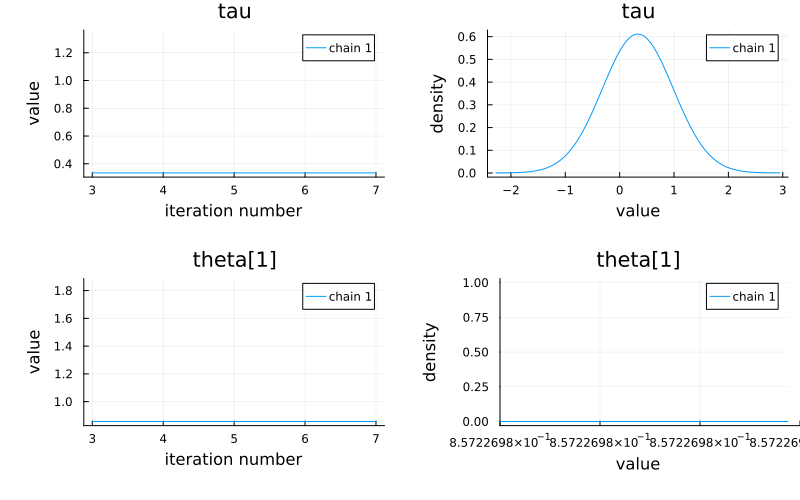
When plotting a VNChain, array-valued parameters will automatically be split up into their individual components. In this example we plot only tau and theta[1] to save space, but if you were to plot theta, you would get eight separate plots for each element of theta.
using StatsPlots

# Or omit the second argument to plot all parameters.
plot(chain, [@varname(tau), @varname(theta[1])])
savefig("plot_ex.svg");
GKS: Possible loss of precision in routine SET_WINDOW